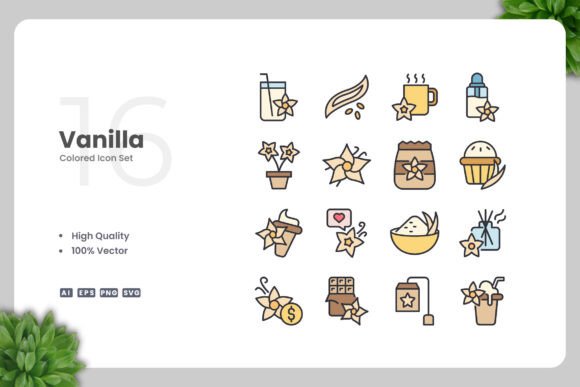
Vanilla Colored Icons for Versatile Design
Visual communication relies on clarity, and few tools deliver that as effectively as a well-crafted icon set. Vanilla Colored Icons offer a straightforward yet powerful resource for anyone who needs polished, adaptable visuals without the overhead of complex design work. This collection focuses on clean lines, soft color palettes, and consistent styling, making it suitable for projects ranging from mobile apps to printed flyers. Whether you are a seasoned professional or just starting out, understanding what this set offers and how it fits into your workflow can save you time and elevate your final output.
The value of such a set goes beyond its visual appeal. Because the icons are delivered in multiple vector formats, including AI, EPS, SVG, and PNG, they can be resized, recolored, and rearranged with minimal effort. This flexibility matters differently depending on who you are and what you are trying to achieve. Let’s explore how different users might approach Vanilla Colored Icons and what priorities come into play.
What Makes Vanilla Colored Icons Stand Out
At its core, this icon set delivers a consistent visual language built around simple, recognizable shapes and a restrained color palette. The term vanilla here suggests a neutral, approachable aesthetic that does not compete with your content. Instead, it supports your message clearly. Each icon is designed with high-quality vector paths, meaning they remain crisp at any size, from a small button on a website to a large poster.
The package includes source files in Adobe Illustrator (AI) and EPS Version 10, along with SVG for web use and PNG with transparency for quick deployment. A readme.txt file provides basic instructions, so you are never left guessing. The drag-and-drop ease of the PNG files means you can start using icons immediately, even if you do not own vector editing software. For those who do, the editable source files open up a world of customization.
Priorities That Matter Across Use Cases
- Speed of deployment: PNG files with transparency allow instant use in presentations, social media graphics, or documents.
- Quality and consistency: Every icon shares the same stroke weight, corner rounding, and color logic, which creates a unified look.
- Long-term usefulness: Vector formats ensure the icons remain editable and scalable for years, regardless of how your projects evolve.
- Cost-effectiveness: A single purchase covers many projects, eliminating the need to license individual icons repeatedly.
How Beginners and Hobbyists Benefit
If you are new to design or simply need visuals for a personal project, Vanilla Colored Icons remove a common barrier: the need to create graphics from scratch. You can open the PNG folder, pick an icon that fits your idea, and drop it into a flyer, blog post, or scrapbook page. The clean style means the icon immediately looks professional, even if you have no formal training.
For a hobbyist creating a simple website for a local club or a family event, the SVG files are ideal. You can paste the code directly into a web page without needing to learn complex image editing. If you later decide to change the color scheme, opening the SVG in a free vector editor like Inkscape lets you adjust the fill color quickly. This learning curve is gentle, and the readme file guides you through the basics.
Practical example: A beginner building a small blog about gardening can use the plant-related icons from the set to label categories, decorate the sidebar, or create social media posts. The uniform style ensures the blog looks cohesive from day one.
Professionals and Experienced Creators
For designers, marketers, and developers who work under deadlines, consistency and editability are non-negotiable. Vanilla Colored Icons deliver on both fronts. The AI and EPS source files allow you to open the entire set in Adobe Illustrator or CorelDRAW, select any icon, and modify its color, size, or shape to match a brand guideline. You can also combine icons, rotate elements, or build composite graphics without losing quality.
Experienced users often appreciate the 100% vector promise because it guarantees that scaling up for a billboard or down for a mobile icon does not introduce pixelation. The EPS Version 10 compatibility ensures older software versions can open the files, which is helpful when collaborating with agencies or printers that have not upgraded their tools.
Integrating into a Professional Workflow
- Use the SVG files directly in web prototypes with frameworks like React or Vue.
- Import the AI file into Figma or Sketch via conversion for UI design mockups.
- Recolor icons in bulk using layer styles in Illustrator to match a client’s palette.
- Drag PNG icons into PowerPoint or Keynote for polished business presentations.
Practical example: A freelance designer creating a brand identity for a local coffee shop can use the food and beverage icons in the set to design the menu board, the website, and the social media templates. Because the icons are vector, they can scale from a tiny favicon to a large storefront sign without rework.
Educators and Trainers
Teachers, content creators, and workshop leaders need visuals that communicate clearly without distracting learners. Vanilla Colored Icons fit this role well because of their simple, uncluttered design. You can use them in handouts, slide decks, or online course modules to illustrate concepts without overwhelming the viewer.
The ability to change colors is particularly useful in education. You might use a blue version of an icon to indicate a link in a digital lesson, then switch to grayscale for a printed worksheet. The consistent style across the set helps learners focus on the content rather than deciphering varying icon formats.
Practical example: A corporate trainer preparing a module on workplace safety can use the people and warning icons from the set to create clear, accessible slides. The icons can be resized for both projected slides and take-home PDFs, ensuring the same visual language appears in every format.
Small Business Owners and Entrepreneurs
Running a business often means producing your own marketing materials until you can afford a dedicated designer. Vanilla Colored Icons give you a library of professional visuals that you can use across flyers, banners, posters, email newsletters, and social media. Because the set covers a broad range of common topics, you will likely find relevant icons for your industry without needing to search multiple sources.
The PNG transparency files are especially valuable for entrepreneurs who create graphics using tools like Canva or Affinity Publisher. You simply drag the icon onto your canvas, resize it, and layer it over your background. The clean look of the icons ensures they work well over photos, gradients, or solid colors.
Practical example: A small bakery owner can use the food and celebration icons to design a seasonal flyer, a banner for the shop window, and a series of Instagram posts. The consistent style builds brand recognition, while the ability to recolor the icons in Illustrator allows matching the bakery’s brand colors.
Publishers and Print Designers
For book layouts, magazines, infographics, and brochures, icons need to reproduce cleanly at various sizes and in different printing conditions. Vanilla Colored Icons are designed with high-quality paths that print sharply on both digital and offset presses. The EPS format is a standard in the print industry, making it easy to place icons into layout software like InDesign or QuarkXPress.
The readme file includes notes about file usage, which can help avoid common pitfalls like missing font links or incorrect color spaces. Since the icons are vector, you can convert them to CMYK for print or keep them in RGB for digital use without degrading quality.
Practical example: A publisher creating an infographic about renewable energy can pull icons from the set to represent solar, wind, and hydro power. The uniform style ensures the infographic reads cleanly, and the vector format allows the designer to scale icons to fit the layout precisely.
Evaluating Whether This Set Matches Your Needs
Choosing an icon set involves weighing several factors. Here are considerations that different users might prioritize:
Ease of Use
If your primary concern is grabbing an icon and using it immediately, the PNG files in this set make that trivial. No software purchase, no learning curve, no editing required. The drag-and-drop approach is ideal for social media managers, bloggers, and anyone who needs speed.
Flexibility and Customization
If you need to match a brand palette or create a unique look, the vector source files (AI and EPS) give you full control. You can change colors, adjust shapes, combine icons, or add effects. This matters most to designers and developers who treat icons as building blocks rather than finished products.
Quality and Presentation
High-quality vector paths ensure the icons look polished in any context. If your work will be displayed publicly or printed at large sizes, the clean construction prevents ugly artifacts or uneven lines. This is crucial for professionals whose reputation depends on visual precision.
Cost and Long-Term Value
A single purchase that includes multiple formats and a broad range of icons often provides better value than subscribing to a stock icon service or buying individual icons. For freelancers, small businesses, and educators with limited budgets, this upfront cost can be recouped many times over.
Getting Started with Vanilla Colored Icons
Regardless of your skill level or project type, the path to using this set is straightforward. Unzip the downloaded folder and you will find subfolders for each format. Open the PNG folder to drag icons into any application. If you need to customize, open the AI or EPS file in Illustrator or CorelDRAW. The readme.txt file contains a quick reference, but the organization is intuitive enough that most users can start immediately.
For web developers, the SVG files offer inline control over color and size via CSS, which is perfect for responsive designs. For print designers, the EPS files work seamlessly with professional layout tools. For everyone else, the PNG files provide a simple, reliable way to enhance visual communication.
Final Thoughts on Versatility
Vanilla Colored Icons sit at the intersection of simplicity and utility. They do not try to be trendy or edgy, which is precisely their strength. The clean design and restrained coloring make them appropriate for a wide range of contexts, from a child’s school project to a corporate annual report. By offering multiple formats and easy editability, the set accommodates beginners who need simplicity and professionals who demand control.
If you value consistency, speed, and the ability to adapt visuals to your own needs, this icon set is worth considering. The low barrier to entry and the high ceiling for customization mean it can grow with your skills and serve you across many projects over time. Whether you are designing a mobile app, producing a podcast cover, or building a small business website, having a reliable, flexible icon library in your toolkit removes one more obstacle between you and a polished final product.