Why Tracking Colored Icons Are a Versatile Asset for Modern Design Projects
Visual communication relies heavily on icons that convey meaning at a glance. Among the many icon sets available, Tracking Colored Icons stands out as a practical collection designed for clarity and adaptability. Whether you need indicators for shipment tracking, progress monitoring, data visualization, or any system that requires directional or status signals, this set offers a clean, color-coded approach that works across print and digital media. In this article, we examine what makes these icons worth considering, their real-world performance, and who stands to benefit most from integrating them into their workflow.
What Are Tracking Colored Icons?
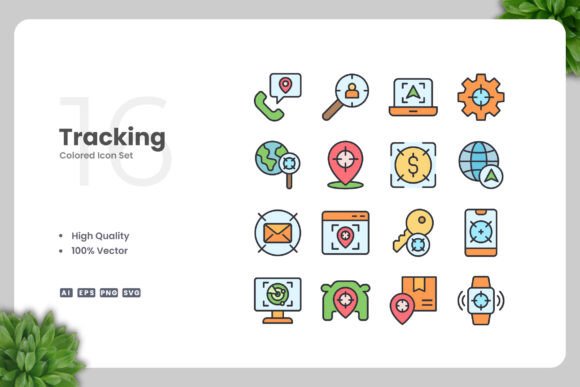
Tracking Colored Icons is a curated set of vector graphics focused on tracking-related concepts. Each icon is rendered in a simple, clean style with deliberate use of color to denote status, direction, or category. The set includes symbols for locations, checkpoints, progress bars, arrows, signals, and similar elements commonly used in logistics, project management, fitness tracking, and user interface design. Unlike monochrome or minimalist icon packs, these icons use color as an integral part of the communication, making them especially useful when you need to convey multiple states or priorities without adding text.
The design philosophy centers on clarity and immediate recognition. Lines are crisp, shapes are geometric, and unnecessary detail is stripped away. This approach ensures that even at small sizes—such as in mobile app icons or footer links—the meaning remains unmistakable. At the same time, the use of color is restrained and purposeful, avoiding the garish or overly playful look that can undermine professional credibility.
Key Characteristics That Define the Set
Several technical and design characteristics contribute to the usefulness of Tracking Colored Icons. Understanding these can help you determine whether the set aligns with your project requirements.
- Fully vector-based: Every icon is constructed using vector paths, which means they are resolution-independent. You can scale them to billboard size or drop them into a 16x16 pixel grid without any loss of sharpness or detail.
- Editable color and shape: Because the icons are delivered as source files in Adobe Illustrator (AI) and EPS format, you can change colors, resize elements, adjust stroke widths, or even combine icons to create new symbols. This level of customization is essential for branding consistency.
- Multiple file formats: The package includes AI, EPS Version 10, SVG, and PNG with transparency. Additionally, a Readme.txt file provides quick instructions. This variety covers nearly every use case: print designers can work with EPS; web developers can drop in SVG; social media managers can use the PNGs directly.
- 100 icons, 100% vector: The set contains exactly 100 distinct icons, each created as an independent vector object. The “100 Vector” claim confirms that no raster elements were embedded, preserving full editability.
- Easy drag-and-drop integration: The files are organized for straightforward copying into your design software. Whether you use Illustrator, CorelDRAW, Affinity Designer, or even a free alternative like Inkscape, you can open the EPS or SVG and start working immediately.
Practical Value Across Media and Platforms
One of the strongest arguments for adopting Tracking Colored Icons is their versatility. The same icon that works on a website header can be reused in a printed flyer, a mobile app notification, or an infographic timeline. Because the design is clean and the color palette is neutral enough to complement most brand identities, you avoid the friction of reworking assets for different output channels.
For example, consider a logistics dashboard. You need icons for “in transit,” “delivered,” “pending,” and “returned.” With this set, you can use a colored arrow pointing right for transit, a green checkmark for delivered, a yellow clock for pending, and a red reverse arrow for returned. All icons share the same line weight and visual style, which creates a cohesive interface. The same icons can then appear in a customer-facing email template or a shipping label without looking mismatched.
Another realistic scenario is an educational infographic tracking student progress. Icons for “not started,” “in progress,” “completed,” and “needs review” can be color-coded to match a legend. Because the icons are simple and geometric, they print cleanly even on standard office printers. And if the infographic needs to be translated into a web graphic, the SVG files ensure sharp rendering on retina displays.
Quality, Usability, and Reliability
When evaluating any icon set, quality is paramount. In the case of Tracking Colored Icons, the vector shapes are well-constructed with clean anchor points and logical grouping. This matters because poorly made vectors often have overlapping paths, excessive points, or missing fills that complicate editing. Here, the source files are organized with layers and named groups in the AI file, making it easy to find and modify specific icons.
Usability extends to the naming and folder structure. The icons are likely named descriptively (e.g., “arrow-right-green.svg,” “location-pin-red.ai”), which saves time when searching for the right graphic. The Readme.txt file adds a small but helpful touch, especially for users who may be less familiar with vector workflows.
Reliability in production is another factor. Because the EPS is saved as Version 10, it maintains backward compatibility with older versions of Illustrator and CorelDRAW. This is a considerate move for professionals who may not have the latest software. The PNG files come with transparency at a reasonable resolution, likely 300 DPI or higher, making them suitable for print without additional cleanup.
Who Benefits Most From Tracking Colored Icons?
This icon set is not a niche product; it serves a broad audience, but some groups will find it particularly valuable.
- UX and UI designers working on apps or websites that include tracking features—such as order status, delivery maps, or workflow progress—will appreciate the ready-made visual language. The color coding reduces the need for additional label text, which saves space on small screens.
- Marketers and social media creators can use the icons in infographics, explainer videos, and presentation slides. The clean look aligns well with corporate aesthetics, and the ability to change colors means you can match your brand palette without starting from scratch.
- Small business owners and entrepreneurs who need to create their own marketing materials, invoices, or process diagrams can use these icons to add a professional touch without hiring a designer. The drag-and-drop simplicity lowers the learning curve.
- Print designers and publishers working on books, posters, flyers, or banners will find the vector scalability essential. An icon that needs to be 2 inches wide on a banner can be scaled up without pixelation, and the color can be adjusted for CMYK output if necessary.
- Educators and serious hobbyists producing instructional content, such as step-by-step guides or organizational charts, can leverage the icons to make information more digestible.
Limitations and Considerations
No product is without potential drawbacks. One limitation of Tracking Colored Icons is that the design is deliberately simple. If you need highly detailed, photorealistic, or decorative icons, this set will feel too minimal. The emphasis on clean lines means the icons work best in contexts where clarity and speed of recognition are priorities, but they may not suit artistic or whimsical projects.
Another consideration is the color scheme. While the set uses practical colors, the specific hues may not match your brand guidelines perfectly. Fortunately, editing the colors in vector software is straightforward, but it does require some time and familiarity with the tools. If you are not comfortable using Illustrator or CorelDRAW, you might find the customization aspect less accessible. In that case, the PNG files offer a quick solution, but you lose the ability to resize without quality loss.
Additionally, the set focuses specifically on tracking concepts. If your project requires icons for unrelated categories—such as food, travel, or entertainment—you would need to supplement this set with another collection. It is best to evaluate whether the 100 icons cover the specific tracking symbols you need before purchasing.
Practical Recommendations for Getting the Most Out of the Set
To maximize the value of Tracking Colored Icons, consider the following approaches:
- Edit colors in the AI file first. Open the source file and create a color palette that matches your brand guidelines. Use the global swatches feature in Illustrator so that any future changes are applied across all icons instantly.
- Export SVGs for web use. SVG files are lightweight and scale perfectly. In addition, they can be styled with CSS, allowing you to change icon colors dynamically on a website without touching the source files.
- Combine icons for custom symbols. Because the icons are separate vector objects, you can group two or three together to create composite graphics, such as a location pin with a checkmark overlay.
- Maintain a consistent stroke weight. If you resize icons significantly, adjust the stroke thickness proportionally to keep the visual style uniform across the entire set.
- Use the EPS files for cross-platform sharing. If you collaborate with designers who use different software, EPS Version 10 is widely supported and preserves vector editing capabilities.
Long-Term Value and Final Assessment
Tracking Colored Icons offer enduring value because vector graphics do not degrade over time and can be repurposed across countless projects. The initial investment in learning to customize the icons pays off with each new use. For professionals and businesses that regularly communicate tracking information—whether in logistics, project management, health and fitness, or data analytics—this set saves hours of design time while maintaining a consistent, professional look.
The clean design and color coding align well with modern user expectations for clarity and accessibility. As long as you are comfortable doing basic vector edits, or are willing to learn, the set provides a flexible foundation that adapts to both print and digital environments. For those who need a reliable, straightforward icon library focused on tracking scenarios, Tracking Colored Icons is a practical choice that balances quality, usability, and affordability.