Origami Colored Icons for Clean and Flexible Design
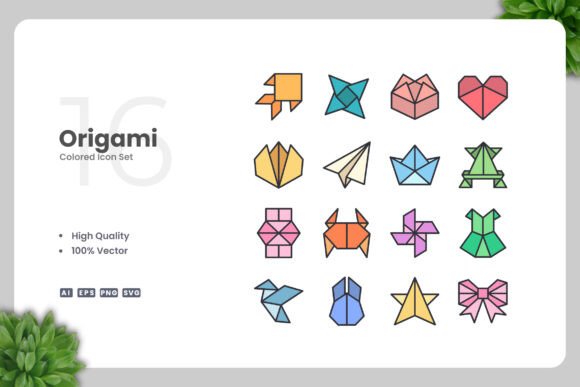
Simple, clean, and full of character — Origami Colored Icons offer a distinctive visual style that works across a wide range of projects. Created by Upnowgraphic, this icon set combines the folded-paper aesthetic with bold, clear colors. Each icon is built as a 100% vector graphic, so resizing, recoloring, or editing is straightforward with software like Adobe Illustrator or CorelDRAW. Whether you are building a website, designing a mobile app, laying out a book, creating social media graphics, or preparing print materials such as flyers, banners, or posters, this set gives you a cohesive starting point. Because the icons originate from vector source files, you can adapt them precisely to your own design needs without losing quality or spending hours redrawing elements.
What Makes This Icon Set Different from Generic Clip Art
The origami style brings a subtle handcrafted feel that stands out among flat or overly detailed icons. Each icon uses clean lines and limited color blocks, which helps maintain visual clarity even at smaller sizes. For a blogger or social media manager, this means thumbnails, buttons, and infographic elements stay readable on mobile screens. For a print designer, the same simplicity ensures that icons reproduce cleanly on flyers or posters without muddying at different scales. Because the set is delivered in multiple formats — including AI, EPS version 10, SVG, and PNG with transparency — you are not locked into one workflow. The included Readme.txt file provides quick orientation, so even if you open the set for the first time, you can locate the files you need and get started without confusion.
Digital Creators and Designers Working with Websites or Apps
If you build websites or develop mobile applications, your icons need to load fast, scale to any resolution, and match your brand palette. SVG files from this set allow you to import icons directly into web frameworks or design tools like Figma and Sketch. Because the SVG code is clean, developers can adjust colors or sizes with CSS if needed. Designers who prefer drag-and-drop efficiency will appreciate that the PNG transparency files are ready to place into mockups or prototypes immediately. For someone who manages multiple client projects, having a consistent icon language that you can recolor per brand saves hours. A freelancer working on a landing page can take the source AI file, swap the default colors to match a client’s hex codes, and export the icons at any size — all without requesting new assets from an illustrator. The flexibility means fewer back-and-forth rounds with clients and faster project delivery.
Educators, Authors, and Infographic Builders
Teachers preparing lesson materials, authors designing instructional books, or content creators building infographics all face a common challenge: visuals must be clear, accurate, and easy to interpret. The clean origami style reduces visual noise, so students or readers can focus on the concept rather than decorative flourishes. If you are creating a handout on recycling processes or a social media carousel explaining a workflow, these icons can be color-coded to guide the eye. Because the vector files are fully editable, you can also combine icons, change their orientation, or scale individual elements without distorting the overall look. For educators who are not professional designers, the easy drag-and-drop nature of the PNG files lowers the entry barrier — you can simply place an icon onto a slide or worksheet without opening vector software at all. Meanwhile, an experienced infographic designer can open the EPS file in Illustrator, tweak anchor points, and create custom compositions that feel unique to the project.
Business Owners and Marketers Creating Brand Materials
When you are running a small business or marketing a service, your visual materials need to look professional without requiring a dedicated design team. Flyers, posters, banners, and social media graphics all benefit from consistent iconography. The Origami Colored Icons set provides a unified visual language across different formats. If you run a café and promote seasonal specials, you might use the same icon on a printed poster, a social media story, and a website banner — each time adjusting the color to fit the campaign. Since the icons ship as AI and EPS version 10 files, you or a local print shop can open them and scale without pixelation. For an entrepreneur who values speed, having a ready-to-use icon library means you can put together a promotional graphic in minutes rather than hours. The commercial value lies in consistency: your audience sees the same visual style across every touchpoint, which builds recognition without requiring a custom illustration budget.
Freelancers and Hobbyists Exploring Creative Projects
Not everyone who uses icon sets is a trained designer. Hobbyists creating a personal blog, a family newsletter, or a community event flyer often need something that looks polished but does not require a steep learning curve. The PNG transparency files work immediately in programs like Canva, PowerPoint, or Word. For someone who wants to experiment with editing, the AI and SVG files offer a safe environment to learn basic vector skills — resizing, changing colors, or rotating elements — without starting from scratch. A freelancer who occasionally takes on logo drafts or social media gigs can rely on this set as a base and customize it to differentiate their work. The long-term usefulness of a vector set is high: you can revisit it years later for new projects, adapt it to evolving brand trends, and reuse icons that remain timeless because of their simple construction. For those still building their design toolkit, having a well-structured set with a clear Readme.txt and multiple formats reduces the frustration of incompatible files.
Print Professionals and Publishers Looking for Reliability
Publishers, book designers, and print production specialists have specific requirements: colors must separate cleanly, images must hold detail at small sizes, and files must be compatible with professional software. The inclusion of EPS version 10 and AI source files makes this set suitable for layout programs like InDesign or QuarkXPress. Because the icons are vector shapes rather than raster images, they remain crisp whether printed at the size of a postage stamp or blown up for a poster. For a children’s book illustrator or an educational publisher who needs to reuse icons across multiple titles, the ability to recolor and resize from a single source file reduces production time. The high-quality design and 100% vector format also mean that you can zoom in on a screen without seeing artifacts — something that matters during proofing and client reviews. For a print buyer working with multiple vendors, providing vector files ensures that each printer generates consistent results regardless of their equipment.
Practical Considerations for Long-Term Use
Investing in an icon set is not just about the current project. Over time, you may rebrand, expand into new media, or need to create variations for different audiences. Because the Origami Colored Icons are 100% customizable and built in vector formats, you are not stuck with the original colors or proportions. The set includes SVG files, which can be opened in free software like Inkscape, as well as premium tools. Having AI and EPS version 10 files also gives you a fallback if future software updates change compatibility. The included PNG transparency files handle quick deployments, but the core value lives in the editable originals. For a design agency that maintains a library of reusable assets, this set can be adapted to fit different clients by simply loading the AI file and applying a new color palette. For an independent creator, learning to modify these icons builds a skill that transfers to other vector projects.
Deciding Whether This Set Matches Your Project Needs
Choosing the right icon set depends on your workflow, your comfort with editing tools, and the visual tone you want to achieve. If your project benefits from a friendly, uncluttered look with a subtle handcrafted edge, the origami style is a strong match. Beginners who want to avoid a long learning curve can start with the PNG files and gradually explore editing the SVG or AI files as they grow comfortable. Professionals who need to produce consistent assets across multiple platforms will appreciate the flexibility of the vector source files and the reliability of the EPS and AI formats. Business owners and marketers focused on speed and brand consistency can use the set right out of the box with minimal adjustments. Educators and publishers who value clarity and reusability will find the clean shapes and editability especially practical. Regardless of your role, the combination of high-quality design, multiple file formats, and straightforward customization options makes this set a useful addition to your creative toolbox.