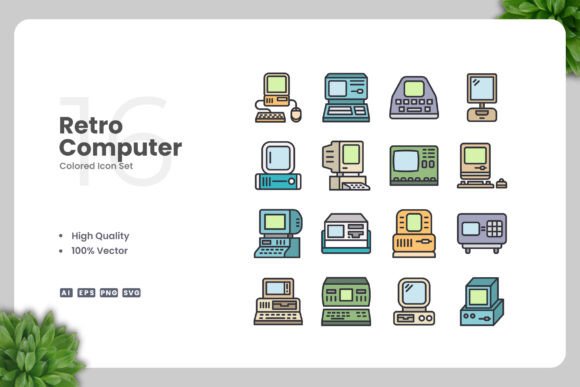
Retro Computer Colored Icons for Clean, Versatile Design Projects
If you have ever browsed through icon sets looking for something that feels both nostalgic and modern, you have likely come across Retro Computer Colored Icons. These are vector graphics inspired by the look of early computing—think pixel art, chunky hardware, floppy disks, CRT monitors, and command prompts—but rendered in a clean, colorful style that fits today’s design standards. They offer a distinct visual personality without looking dated or messy.
The core idea is simple: combine the charm of old-school computing with a polished, simple aesthetic. Each icon is carefully crafted to be recognizable at a glance, using limited but vibrant colors that evoke the late 80s, 90s, and early 2000s tech culture. At the same time, the design stays minimal and uncluttered, making it easy to incorporate into almost any project without overwhelming other elements.
What Makes Retro Computer Colored Icons Stand Out
Unlike generic icon packs that try to be everything to everyone, this set has a clear theme and a consistent visual language. The icons are not just nostalgic for nostalgia’s sake—they are designed to be functional and adaptable. Because they are 100% vector, you can scale them from a tiny social media avatar to a large poster without losing sharpness. Every file is fully customizable, so changing colors, resizing, or tweaking details takes just a few clicks in software like Adobe Illustrator or CorelDRAW.
Another strong point is the balance between personality and clarity. Each icon retains enough retro flavor to spark recognition and emotion, yet remains simple enough to work in professional contexts. Whether you need a floppy disk icon for a save button or a vintage computer monitor for a tech blog header, these graphics feel intentional rather than gimmicky.
Why You Might Want to Use This Icon Set
There are many reasons someone might reach for Retro Computer Colored Icons. Perhaps you are designing a website for a coding bootcamp or a vintage tech store, and you want visuals that resonate with enthusiasts who remember dial-up modems and bulky monitors. Or maybe you are creating a mobile app for a retro gaming community and need icons that feel authentic but still look crisp on modern screens.
Beyond niche projects, these icons work well for anyone who wants to add a warm, human touch to digital content. In a world where many designs feel cold or overly polished, a hint of retro computing can make a brand feel more approachable and memorable. Small business owners, educators, and bloggers often use such icons to break up text, illustrate concepts, or add personality to otherwise standard layouts.
The set also solves a practical problem: finding cohesive icons that are not overly complex. Many free icon sets have inconsistent styles or require extensive editing to look right together. Because this collection is built around a simple, clean design principle, the icons naturally complement each other. You can mix and match without worrying about visual clash.
Where and How to Use Them in Real Projects
The versatility of Retro Computer Colored Icons is one of their biggest strengths. Here are some realistic contexts where they shine:
- Websites and landing pages – Use a retro computer icon as a hero image for a tech blog, or sprinkle smaller icons next to feature lists for a software product. The clean vector look ensures fast loading and retina display compatibility.
- Mobile apps – Icons work well for onboarding screens, settings menus, or empty states. Since they are SVG and PNG ready, you can drop them into iOS or Android projects without hassle.
- Social media graphics – A colorful floppy disk or joystick icon can become the centerpiece of an Instagram post or a Facebook cover. The simple design keeps the focus on your message.
- Infographics and presentations – Instead of using generic shapes, replace them with themed icons to make data more engaging. For example, a bar chart accompanied by a retro monitor icon reinforces a tech-savvy narrative.
- Print materials – Flyers, banners, posters, and book covers all benefit from vector icons. You can scale them to any size without pixelation, and the transparent PNG files let you overlay them on any background.
- Educational content – Teachers and course creators can use these icons to illustrate computer history lessons, coding tutorials, or digital literacy materials. The retro theme makes learning feel more fun and relatable.
Practical Benefits You Will Appreciate
One of the first things you notice when working with this icon set is how easy it is to customize. The source files come in AI (Adobe Illustrator), EPS Version 10, SVG, and PNG with transparency. That means you are not locked into any single tool or format. If you prefer Inkscape or Affinity Designer, the SVG files open cleanly. The EPS Version 10 format is especially useful if you work with older software or need maximum compatibility across platforms.
Drag and drop functionality makes the initial setup nearly instant. You can copy an icon from the folder and place it directly into your design without extra steps. The included Readme.txt file provides a quick overview, so even if you are a beginner, you will know exactly where to start.
Another advantage is the high quality of the vectors themselves. Each icon is built with clean paths and consistent anchor points. When you change a color, the fill behaves predictably, and there are no stray nodes or hidden layers that break the design. For freelancers and professionals who value efficiency, this saves a lot of editing time.
Things to Consider Before Choosing This Set
While Retro Computer Colored Icons are flexible, they work best when the retro computing theme aligns with your content. If your project is about modern cloud computing or futuristic technology, the vintage look might send a mixed message. However, many brands successfully blend retro and modern elements to create a unique identity, so it is not a hard rule.
Also, consider your audience. Adults aged 20 to 50 will likely recognize and appreciate the references, especially if they grew up during the early personal computer era. Younger audiences might enjoy the aesthetic as a stylistic choice, but the icons could carry different connotations depending on the context.
Because the set is 100% vector, you need access to vector editing software if you want to customize colors or sizes beyond basic scaling. If you only have limited tools, the included PNG files cover many common use cases, but the full creative control comes from editing the vector source files. For most designers, marketers, and small business owners, Illustrator or CorelDRAW is a worthwhile investment, and free alternatives like Inkscape work well too.
Finally, remember that simple and clean design means each icon uses a limited color palette and minimal details. This is a strength for consistency and clarity, but if you need highly photorealistic or extremely detailed graphics, a different style may suit you better. The charm of this set lies in its restraint and thematic focus.
Getting Started with Your Icon Set
When you download the Retro Computer Colored Icons, you will find organized folders with all the file formats mentioned. Start by browsing the PNG previews to see the full range of icons available. Then open the AI or EPS file in your vector software. From there, you can select any icon, change its color using the swatches panel, resize it with the transform tool, or combine multiple icons into a single composition.
If you are new to vector editing, a simple exercise is to take one icon and create variations in different colors. For instance, you could make a floppy disk icon in red, blue, green, and yellow. Then use each variation as a bullet point marker in a blog post or as section dividers in a flyer. This small experiment will show you how much visual variety you can achieve with just one shape.
For more advanced projects, consider layering icons with photo backgrounds or using them as masks. The transparent PNG files make overlaying easy, and the SVG files allow you to animate individual parts if you are working on web animations or interactive content.
Final Thoughts on Retro Computer Colored Icons
In a creative landscape where visual consistency and emotional resonance matter, Retro Computer Colored Icons offer a rare combination of personality and practicality. They are not just a collection of nostalgic shapes—they are a toolkit for communicating ideas in a friendly, recognizable way. Whether you are building a brand, teaching a class, or simply wanting to make your social media posts stand out, this set gives you a solid foundation to work from.
The files are designed to be ready out of the box, yet endlessly customizable. With the included AI, EPS, SVG, and PNG formats, you have the freedom to use them exactly as they are or tailor them to fit your unique vision. And because the design is simple and clean, you can focus on your message rather than fighting with overly complex graphics.
If you are looking for a reliable, high-quality icon set that respects your time and creative goals, Retro Computer Colored Icons is a strong choice. They bring a touch of retro warmth to modern projects without sacrificing usability. Have a great day, and happy designing from Upnowgraphic.